Connect the pulpit microphone
Send the microphone or mixer into the console computer. Use USB audio from the mixer or a USB audio interface. A headphone adapter cannot capture audio. See the connection diagrams.
Let your congregation follow the sermon in their own language. The speaker talks as usual. Listeners scan a QR code and hear the translation on their phones, or read captions on the screen.
See one-way translationIn short
Updated
The speaker talks into the usual pulpit microphone, and that audio goes from the mixer into the SalamAI console on a computer. SalamAI translates the speech live into the languages you choose, up to ten at once, such as Bahasa Melayu, English, Mandarin, Tamil or Arabic. Each language has its own QR code. Members of the congregation scan it, open the page in their phone browser and listen with earphones, or read captions on the projector screen. Translated audio typically arrives about 6–20 seconds after the speaker, which suits a sermon, khutbah or community talk. Test names and religious terms first, because AI translation can make mistakes.
Most halls already have what they need. You need a computer for the console, such as a Windows PC or Mac with current desktop Chrome or Edge, a way to get the pulpit or mixer audio into it, such as USB audio from the mixer or a USB audio interface, and stable internet for the console and the congregation’s phones. A projector or screen helps for showing QR codes and captions. Listeners bring their own phones and earphones, so there are no receivers to buy, charge or collect. Before the first service, rehearse with your speaker, check the sound level and listen on a phone in the hall.
Read nextSimultaneous AI translation →Live translation use cases →
On the day
Send the microphone or mixer into the console computer. Use USB audio from the mixer or a USB audio interface. A headphone adapter cannot capture audio. See the connection diagrams.
Pick the languages your community needs, up to ten from one console. Voice and subtitles covers 70+ languages, including Bahasa Melayu, English, Mandarin Chinese, Tamil and Arabic. Test each one first.
Show one QR code per language on the screen, or print it at the entrance. Listeners open it in their phone browser. No app and no receivers to hand out.
Open a full-screen caption window on the projector. Where enabled, send captions to an OBS overlay or a WebVTT feed for your livestream.
Before you go live
Translated audio on phones typically arrives about 6–20 seconds after the speaker. That suits a sermon or talk. For question time, let each person finish, or have the moderator repeat the question from the front.
Earphones keep phone audio from disturbing others in the hall. Listeners who prefer to read can follow captions without them, if you allow captions.
Test the names, scripture or verse references and religious terms you expect to use. AI translation can make mistakes, so ask a bilingual member of your team to listen in during the first services.
Supported sessions can save a transcript and create a summary for people who missed the talk. If you prefer nothing saved, High privacy mode in supported voice sessions stops SalamAI saving recordings, transcripts and summaries.
Inside SalamAI
Show translated captions full-screen on a display or projector.
Inside SalamAI
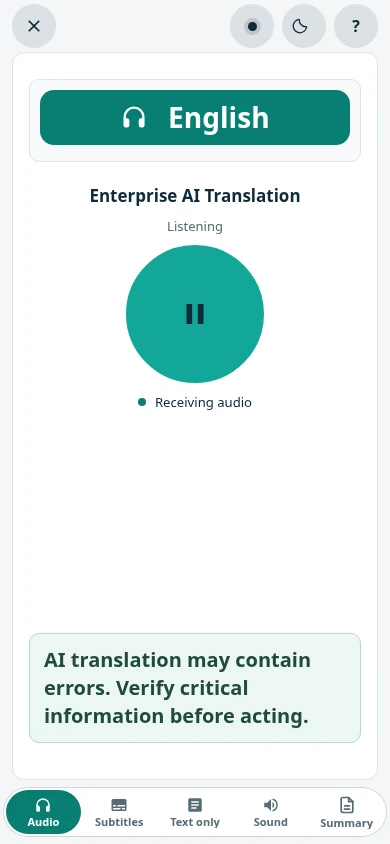
Listeners tap Play to hear the translation, then switch between Audio, Subtitles and Text only from the bar at the bottom. Sound picks the audio output, and Summary requests documents where enabled.
Common questions
No. Each language has its own QR code and link. Listeners open it in their phone browser and use their own earphones. They need internet access during the service.
Yes. Translated audio on phones typically arrives about 6–20 seconds after the speaker. Captions on a shared screen help people follow along. Test with your speaker before the first service.
Where enabled, SalamAI can send captions to an OBS overlay or an external WebVTT feed. You can also show captions full-screen on the projector in the hall. See captions options.
Not always. AI translation can make mistakes with names, scripture references and special terms. Test the terms you use often, and ask a bilingual member of your team to check the first few services.
Plan your event
Tell us your languages, crowd size and audio setup. We’ll show you SalamAI live and suggest the right setup for your event.
Already have an account? Open the console →