Bahasa Melayu, English, Mandarin and Tamil
All four are spoken aloud with live subtitles in Voice and subtitles, which covers 70+ languages and adds Arabic for international guests. Run up to ten languages from one console at the same time.
Malaysian events often need four languages in one room. SalamAI translates the speaker live, and each guest listens or reads captions on their own phone, in the language they are most comfortable with.
Check supported languagesIn short
Updated
Start with the languages your guests actually speak. Many Malaysian events need Bahasa Melayu, English, Mandarin and Tamil together, and international events may add Arabic or other languages. With SalamAI, the speaker’s microphone feeds one console that runs up to ten languages at once. Each language gets its own QR code, so guests listen on their own phones with earphones, and you can show captions on the big screen for everyone else. There are no receivers to hand out or collect. Before the day, test each language pair with your own speakers and check the venue internet, because the console and every phone need to stay online.
Check four things. First, the languages: list what your guests actually need, and test each pair with your own speakers, including local names, places and terms. Second, the sound: send clean audio from the mixer into the console computer and do a level check. Third, the internet: venue Wi-Fi or mobile data must handle the console and every listening phone, so test it with the crowd size you expect. Fourth, the guests: put QR codes on screens and printed signs, remind people to bring earphones, and show captions for those who prefer to read. On the day, tell the audience that translated audio on phones runs about 6–20 seconds behind the stage.
Read nextSupported translation languages →Translation for places of worship →
Made for Malaysian rooms
All four are spoken aloud with live subtitles in Voice and subtitles, which covers 70+ languages and adds Arabic for international guests. Run up to ten languages from one console at the same time.
Operators can use the console in English, Malay or Simplified Chinese. The interface language is separate from the languages being translated.
Guests scan the QR code for their language and listen with their own earphones. There are no receivers to hand out, count and collect at the end.
Show translated or same-language captions full-screen on the projector, so people without earphones can follow too.
Inside SalamAI
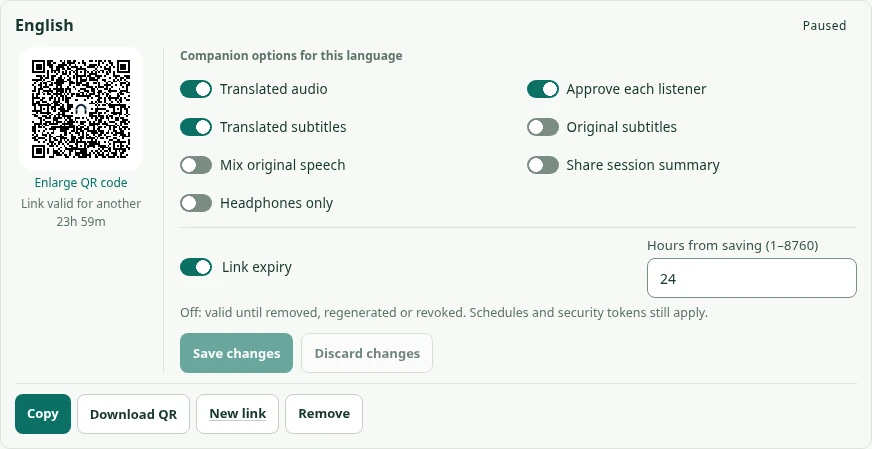
Share a QR code for each audience language. It uses the SalamAI logo by default, or your organiser logo when configured. Set audio, captions and joining rules in the same place.
Where it is used
Use SalamAI for conferences and exhibitions, government and community briefings, company townhalls and training, and sermons and community talks. Reception desks and event counters can use two-way translation stations for one-to-one help.
Before the event, test each language pair with your own speakers, including local names and terms. Check the venue Wi-Fi or mobile data for the number of guests you expect, because the console and every phone need internet throughout.
See all use casesWho is behind SalamAI
SalamAI is built by Ordinexis Sdn Bhd. For a demo, a quote or a question about your event, email hey@ordinexis.com with your event date, languages, crowd size and audio setup.
Meet Ordinexis ↗Common questions
Yes. Bahasa Melayu, English, Mandarin Chinese and Tamil are all in the broader translation list, and one console can run up to ten output languages at once. Test each language pair with your speakers first. See supported languages.
SalamAI is a product of Ordinexis Sdn Bhd. Email hey@ordinexis.com for a demo or quote.
There is no single public price. SalamAI charges connected translation time per output language at your organisation’s agreed rates, and audience size does not add translation sessions. See how pricing works.
Plan your event
Tell us your languages, crowd size and audio setup. We’ll show you SalamAI live and suggest the right setup for your event.
Already have an account? Open the console →